Modern DevOps engineering relies heavily on automated delivery pipelines to ship features rapidly without introducing downtime or code regressions. Implementing a robust GitHub Actions CI/CD workflow allows software development teams to validate pull requests, execute comprehensive test suites, package isolated application binaries, and trigger zero-downtime cloud releases automatically.
Without structured pipeline automation, development lifecycles suffer from inconsistent build artifacts, slow manual deployment verification, and credential leak risks. Adopting production-grade pipeline patterns transforms your delivery frequency while guaranteeing enterprise stability.
1. 1. Build a Standard GitHub Actions CI/CD Pipeline Architecture
A reliable GitHub Actions CI/CD workflow follows a strict sequential gate where failing jobs halt subsequent production steps immediately:
- Static Analysis & Linting: Enforces type checking, syntax rules, and formatting standards across the entire repository.
- Automated Unit & Integration Testing: Executes test suites against isolated mock dependencies and databases.
- Containerization & Packaging: Builds multi-stage Docker artifacts and pushes tagged release candidates to a container registry.
- Environment Deployment: Deploys code to staging environments first, requiring manual approvals for production rollouts.
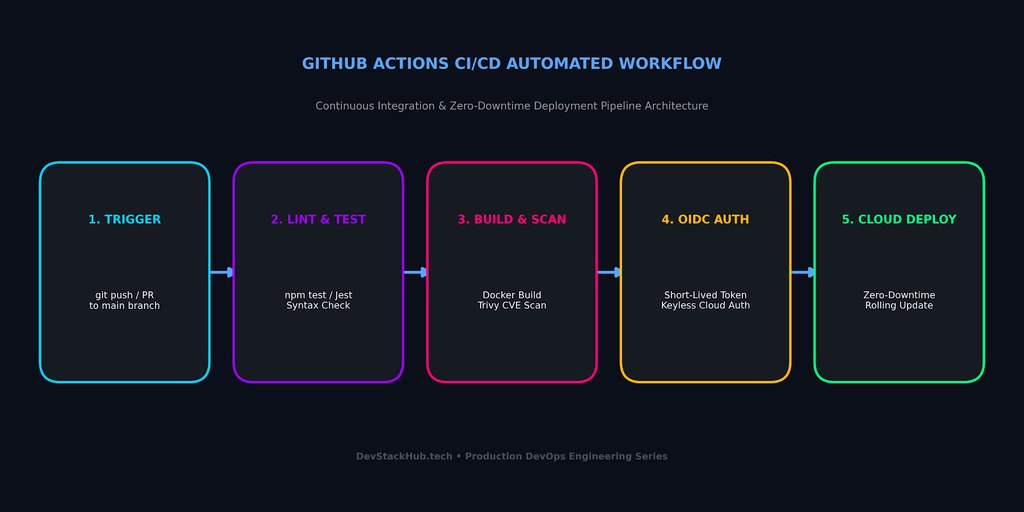
2. Production Workflow Blueprint (deploy.yml)
Create a .github/workflows/deploy.yml configuration file inside your repository root:
name: Production Deployment Pipeline

on:
  push:
    branches:
      - main
  pull_request:
    branches:
      - main

jobs:
  test:
    name: Run Unit & Integration Tests
    runs-on: ubuntu-latest
    steps:
      - name: Checkout Code
        uses: actions/checkout@v4

      - name: Setup Node Runtime
        uses: actions/setup-node@v4
        with:
          node-version: '20'
          cache: 'npm'

      - name: Install Dependencies
        run: npm ci

      - name: Run Test Suite
        run: npm test

  build-and-deploy:
    name: Build and Deploy to Cloud
    needs: test
    if: github.ref == 'refs/heads/main'
    runs-on: ubuntu-latest
    steps:
      - name: Checkout Code
        uses: actions/checkout@v4

      - name: Deploy to Cloud Infrastructure
        env:
          CLOUD_API_TOKEN: ${{ secrets.CLOUD_DEPLOY_SECRET }}
        run: |
          echo "Deploying verified release to cloud cluster..."
Configuring needs: test guarantees that no broken build ever reaches your production infrastructure.
3. Secure Your GitHub Actions CI/CD Workflows with OIDC
Security breaches in automated pipelines often occur due to exposed long-lived API tokens. To safeguard your GitHub Actions CI/CD workflows:
- Use GitHub Repository Secrets: Never commit
.envfiles or hardcoded credentials into source control. Store database connection strings and registry passwords under Settings $\rightarrow$ Secrets and variables $\rightarrow$ Actions. - Adopt OpenID Connect (OIDC): Authenticate with major cloud providers (such as AWS, Google Cloud, and Microsoft Azure) using short-lived tokens. OIDC eliminates the need to store static cloud access keys inside GitHub.
- Restrict Workflow Permissions: Explicitly define the
permissions:block at the top of your workflow file following the principle of least privilege.
4. Optimize Workflow Runtimes with Dependency Caching
Slow deployment pipelines degrade developer productivity. One of the best ways to speed up GitHub Actions CI/CD execution is caching static dependencies across runs:
- Package Manager Caching: Use built-in cache parameters in setup actions (such as
cache: 'npm',cache: 'pip', orcache: 'maven'). - Docker Layer Caching: Utilize
actions/cacheor BuildKit GitHub Actions cache backends to avoid rebuilding unchanged image layers.
- name: Cache Node Modules
  uses: actions/cache@v4
  with:
    path: ~/.npm
    key: ${{ runner.os }}-node-${{ hashFiles('**/package-lock.json') }}
    restore-keys: |
      ${{ runner.os }}-node-
Caching frequently cuts pipeline execution time by 50% to 70%.
5. Enforce Zero-Downtime Deployment Strategies
Achieving zero-downtime releases with GitHub Actions CI/CD ensures seamless user experience during cloud updates. Deploying updates to live applications should never cause downtime for active users:
- Blue-Green Deployments: Spin up a new release environment (Green) alongside the current live instance (Blue). Once automated health checks confirm zero errors, the load balancer switches traffic instantaneously.
- Rolling Deployments: Update container instances incrementally within your cluster to ensure maximum capacity remains available throughout the rollout.
6. Common GitHub Actions CI/CD Pitfalls and How to Avoid Them
When scaling automated pipelines across engineering teams, several frequent bottlenecks can emerge:
- Unpinned Action Versions: Relying on mutable action tags (like
@v1or@latest) can introduce breaking changes unexpectedly. Always pin community actions to immutable Git commit SHAs or verified semantic releases to guarantee deterministic builds. - Unbounded Runner Concurrency: Running parallel matrix jobs without limits can quickly exhaust your monthly workflow compute minutes. Define reasonable concurrency groups to automatically cancel obsolete queued runs when new commits are pushed.
- Missing Secret Masking: While GitHub automatically masks configured repository secrets, avoid debugging scripts that echo interpolated environment variables or decoded base64 strings into standard output logs.
Connecting Pipelines to Cloud Deployments
Pairing automated workflow execution with Production-Ready Docker Containers or an Azure App Service Deployment creates a complete continuous deployment loop. For detailed workflow syntax references, consult the official GitHub Actions Documentation.
Ensure your automated test suites and build runners package isolated artifacts using our Production-Ready Docker Containers Guide.
Combine your automated CI/CD pipeline triggers with zero-downtime deployment slots via our Azure App Service Setup Guide.