Deploying Docker containers in modern cloud ecosystems demands robust, lightweight, and resilient environments. While getting a basic container to run locally takes minimal effort, deploying Production-Ready Docker Containers requires careful consideration of security boundaries, image sizes, layer caching, and runtime privileges.
Misconfigured containers frequently suffer from multi-gigabyte footprints, extended build and deployment times across CI/CD pipelines, and severe attack surfaces stemming from root-level access. By applying systematic container hardening and optimization practices, engineering teams can dramatically decrease latency, cloud compute spend, and operational vulnerabilities.
1. Implement Multi-Stage Builds for Docker Containers
The most impactful optimization for Production-Ready Docker Containers is the multi-stage build pattern. Standard Dockerfiles frequently bundle package managers, source code compilers, intermediate artifacts, and test runners directly into the production container image.
Multi-stage builds decouple the build environment from the final execution environment. Heavy dependencies, build caches, and developer SDKs are retained only within intermediate stages and discarded before generating the final runtime artifact.
# Stage 1: Build & Compilation Environment
FROM node:20-alpine AS builder
WORKDIR /app
COPY package*.json ./
RUN npm ci
COPY . .
RUN npm run build

# Stage 2: Hardened Production Runtime
FROM node:20-alpine AS runner
WORKDIR /app
ENV NODE_ENV=production

# Copy only production artifacts and dependencies
COPY --from=builder /app/package*.json ./
COPY --from=builder /app/dist ./dist
RUN npm ci --only=production

USER node
EXPOSE 3000
CMD ["node", "dist/index.js"]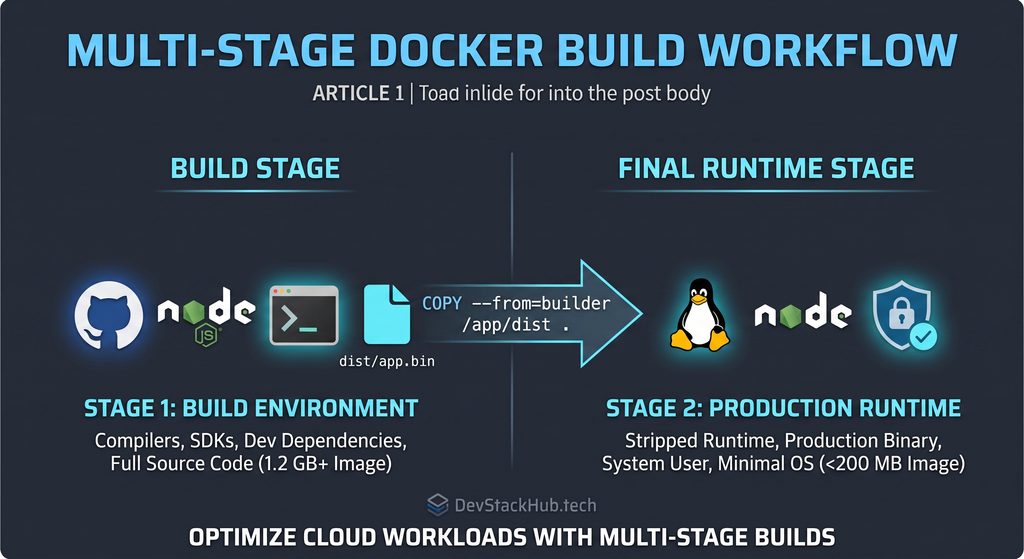
By decoupling these steps, final image sizes often drop by 60% to 85%, which directly decreases network transfer latencies during cluster auto-scaling events on platforms like AWS ECS, Kubernetes, and Azure App Service.
2. Enforce Least-Privilege Execution (Never Run as Root)
A primary security flaw in poorly configured container images is running processes under the default root user (UID 0). If an application suffers from a remote code execution vulnerability or a container breakout, the attacker inherits root capabilities over the underlying system host.
To enforce the principle of least privilege:
- Use Pre-existing Unprivileged Users: Many official base images provide unprivileged runtime accounts, such as
nodein Node.js images ornobodyin minimal Alpine setups. - Create Custom System Users: In custom Linux environments, define a dedicated system user and group before executing the main runtime binary.
# Create system user and restrict filesystem permissions
RUN addgroup -S appgroup && adduser -S appuser -G appgroup
RUN chown -R appuser:appgroup /app

USER appuser
Switching to an unprivileged account should always occur immediately before the final ENTRYPOINT or CMD directive.
3. Maximize Docker Layer Caching Efficiency
Docker evaluates build steps top-to-bottom, caching individual intermediate layers. If a layer changes, every subsequent layer is rebuilt from scratch, invalidating the cache and extending CI/CD build runtimes.To optimize caching speed for Docker containers, structure your Dockerfile layers deliberately.
To optimize build speed for Docker Containers:
- Order by Change Frequency: Place infrequently updated instructions (such as OS package updates and dependency installations) near the top of the file. Place application source code, which changes on almost every commit, near the bottom.
- Maintain a Comprehensive
.dockerignore: Exclude temporary directories,.githistories, local.envconfiguration files, andnode_modulesfrom entering the Docker build context.
# .dockerignore example
node_modules
.git
.gitignore
npm-debug.log
dist
.env
4. Choose Hardened, Minimal Base Images
Selecting the right base image establishes both your security baseline and resource consumption:
- Alpine Linux: Offers an ultra-lightweight footprint (~5 MB base) with a reduced surface for common vulnerabilities.
- Google Distroless: Strips out all non-essential binaries—including shell environments like
bash/shand package managers—leaving only the runtime application and system libraries.
Using minimal distributions prevents attackers from executing shell scripts or downloading secondary exploitation payloads if an endpoint is compromised.
5. Automate Vulnerability Scanning in CI/CD Workflows
Hardening configurations does not prevent newly discovered Common Vulnerabilities and Exposures (CVEs) in third-party runtime packages. Integrating automated static container analysis tools directly into GitHub Actions or GitLab CI guarantees that vulnerable images are caught before reaching container registries. Regular automated scanning guarantees your Docker containers remain protected against new zero-day vulnerabilities.
Standard industry scanners include:
- Trivy: Comprehensive security scanner covering OS packages and language dependencies.
- Docker Scout: Deep image analysis providing immediate remediation commands within standard development pipelines.
Strategic Next Steps
Building reliable container infrastructure is the baseline for automated deployment architectures. Connecting hardened container images to modern deployment patterns like an Azure App Service Deployment ensures scalable, production-grade cloud stability.