Manual provisioning in cloud portals leads to configuration drift, untracked security loopholes, and brittle production environments. Infrastructure as Code (IaC) solves these failure modes by treating infrastructure topologies with the exact same rigor as core software codebases: version-controlled, tested, peer-reviewed, and automatically deployed through continuous integration and continuous deployment (CI/CD) pipelines.
Using Terraform Azure automation paired with GitHub Actions delivers a declarative, repeatable, and scalable cloud foundation. In this production-ready guide, we will design and deploy a complete Microsoft Azure infrastructure stack—including remote state locking via Azure Blob Storage, network isolation with Network Security Groups (NSGs), and an Azure Container Registry (ACR)—automated entirely through an enterprise GitHub Actions CI/CD workflow.
Table of Contents
Core Architecture & Workflow Design
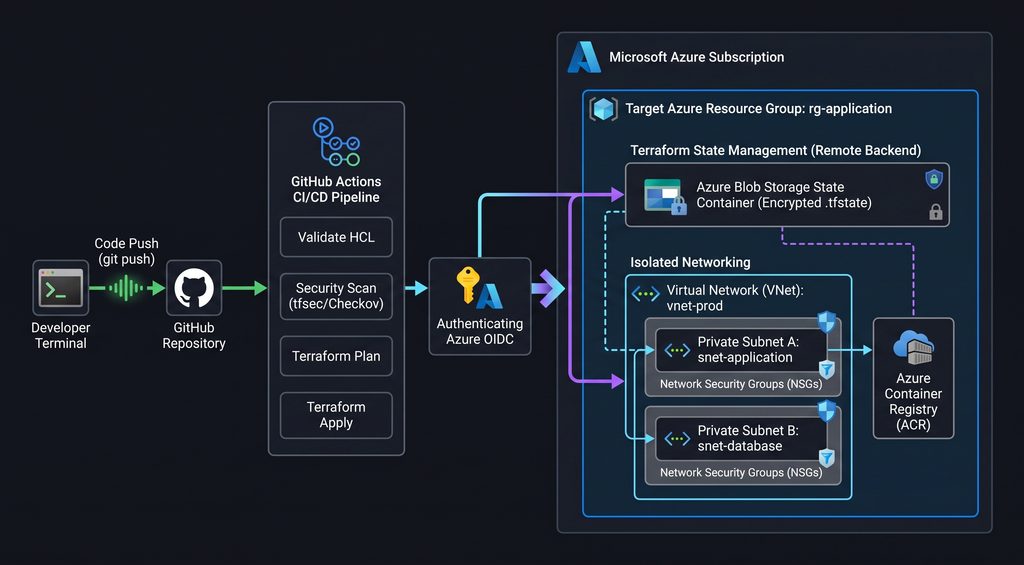
Before executing code, establishing an isolated directory layout and remote state backend is essential. Running Terraform locally or committing state files to source control creates race conditions, risks catastrophic state corruption, and exposes sensitive infrastructure attributes.
terraform-azure-iac/
├── .github/
│   └── workflows/
│       └── terraform-pipeline.yml
├── backend.tf
├── main.tf
├── outputs.tf
├── terraform.tfvars.example
└── variables.tf
1. Setting Up the Secure Azure Remote State Backend
Terraform relies on state files to map declarative configurations to real-world cloud resources. In team environments, the state file must reside in a secure, centralized store supporting distributed state locking. Azure Blob Storage natively handles state encryption and distributed locking via storage blob leases.
Execute this bootstrap Bash script once via the Azure CLI to provision the state storage infrastructure:
#!/usr/bin/env bash
set -euo pipefail

# Configuration Variables
RESOURCE_GROUP_NAME="rg-terraform-state-prod"
LOCATION="eastus"
STORAGE_ACCOUNT_NAME="tfstatebackend$(openssl rand -hex 4)"
CONTAINER_NAME="tfstate"

echo "Creating Resource Group: ${RESOURCE_GROUP_NAME}..."
az group create --name "${RESOURCE_GROUP_NAME}" --location "${LOCATION}"

echo "Provisioning Hardened Storage Account: ${STORAGE_ACCOUNT_NAME}..."
az storage account create \
  --name "${STORAGE_ACCOUNT_NAME}" \
  --resource-group "${RESOURCE_GROUP_NAME}" \
  --location "${LOCATION}" \
  --sku Standard_LRS \
  --min-tls-version TLS1_2 \
  --allow-blob-public-access false \
  --https-only true

echo "Creating Private Storage Container..."
az storage container create \
  --name "${CONTAINER_NAME}" \
  --account-name "${STORAGE_ACCOUNT_NAME}"

echo "Remote backend initialized successfully."
This storage container serves as the centralized state backend for our Terraform Azure project.
Configure your remote backend declaration in backend.tf:
terraform {
  required_version = ">= 1.5.0"

  required_providers {
    azurerm = {
      source  = "hashicorp/azurerm"
      version = "~> 3.90.0"
    }
  }

  backend "azurerm" {
    resource_group_name  = "rg-terraform-state-prod"
    storage_account_name = "REPLACE_WITH_YOUR_STORAGE_ACCOUNT_NAME"
    container_name       = "tfstate"
    key                  = "prod.terraform.tfstate"
  }
}

provider "azurerm" {
  features {
    resource_group {
      prevent_deletion_if_contains_resources = false
    }
  }
}
2. Terraform Azure Infrastructure Definitions
With remote state established, define your modular cloud assets. We will declare our inputs, core networking, access controls, and container registry components.
Defining Input Variables (variables.tf)
variable "project_name" {
  type        = string
  description = "Base naming prefix for all provisioned infrastructure resources"
  default     = "devstack"
}

variable "environment" {
  type        = string
  description = "Target deployment environment tier (dev, stage, prod)"
  default     = "prod"
}

variable "location" {
  type        = string
  description = "Target Azure region for resource provisioning"
  default     = "eastus"
}

variable "vnet_address_space" {
  type        = list(string)
  description = "Address prefix CIDR block allocated to the Virtual Network"
  default     = ["10.0.0.0/16"]
}

variable "subnet_address_prefix" {
  type        = list(string)
  description = "Address prefix CIDR block allocated to the application subnet"
  default     = ["10.0.1.0/24"]
}
Configuring flexible inputs is essential when managing multi-tier Terraform Azure environments.
Implementing Core Infrastructure Resources (main.tf)
# Primary Infrastructure Resource Group
resource "azurerm_resource_group" "rg" {
  name     = "rg-${var.project_name}-${var.environment}"
  location = var.location

  tags = {
    Environment = var.environment
    ManagedBy   = "Terraform"
    Project     = var.project_name
  }
}

# Network Security Group (NSG) with Hardened Inbound Rules
resource "azurerm_network_security_group" "nsg" {
  name                = "nsg-${var.project_name}-${var.environment}"
  location            = azurerm_resource_group.rg.location
  resource_group_name = azurerm_resource_group.rg.name

  security_rule {
    name                       = "AllowHTTPSInbound"
    priority                   = 100
    direction                  = "Inbound"
    access                     = "Allow"
    protocol                   = "Tcp"
    source_port_range          = "*"
    destination_port_range     = "443"
    source_address_prefix      = "*"
    destination_address_prefix = "*"
  }

  tags = {
    Environment = var.environment
    ManagedBy   = "Terraform"
  }
}

# Isolated Virtual Network Topology
resource "azurerm_virtual_network" "vnet" {
  name                = "vnet-${var.project_name}-${var.environment}"
  location            = azurerm_resource_group.rg.location
  resource_group_name = azurerm_resource_group.rg.name
  address_space       = var.vnet_address_space

  tags = {
    Environment = var.environment
    ManagedBy   = "Terraform"
  }
}

# Application Tier Subnet
resource "azurerm_subnet" "app_subnet" {
  name                 = "snet-app-${var.environment}"
  resource_group_name  = azurerm_resource_group.rg.name
  virtual_network_name = azurerm_virtual_network.vnet.name
  address_prefixes     = var.subnet_address_prefix
}

# Associate NSG with Application Subnet
resource "azurerm_subnet_network_security_group_association" "nsg_assoc" {
  subnet_id                 = azurerm_subnet.app_subnet.id
  network_security_group_id = azurerm_network_security_group.nsg.id
}

# Private Azure Container Registry (ACR)
resource "azurerm_container_registry" "acr" {
  name                = "acr${var.project_name}${var.environment}01"
  resource_group_name = azurerm_resource_group.rg.name
  location            = azurerm_resource_group.rg.location
  sku                 = "Standard"
  admin_enabled       = false

  tags = {
    Environment = var.environment
    ManagedBy   = "Terraform"
  }
}
These declarative blocks provision the core Terraform Azure virtual network and container registry assets.
Exporting Infrastructure Metadata (outputs.tf)
output "resource_group_name" {
  value       = azurerm_resource_group.rg.name
  description = "The assigned name of the primary resource group."
}

output "vnet_id" {
  value       = azurerm_virtual_network.vnet.id
  description = "The Azure Resource Manager ID of the virtual network."
}

output "acr_login_server" {
  value       = azurerm_container_registry.acr.login_server
  description = "The login URL for the provisioned Azure Container Registry."
}
3. Automating CI/CD with GitHub Actions
Automating Terraform execution through GitHub Actions enforces continuous linting, speculative planning on pull requests, and automated deployment upon merging into the default branch.
Configuring Azure Service Principal Credentials
To authenticate GitHub Actions with Microsoft Azure, create an Azure Active Directory Service Principal with scoped Contributor rights:
az ad sp create-for-rbac \
  --name "sp-github-actions-terraform" \
  --role "Contributor" \
  --scopes "/subscriptions/YOUR_AZURE_SUBSCRIPTION_ID" \
  --sdk-auth
Store the resulting credentials inside your GitHub repository settings (Settings > Secrets and variables > Actions):
AZURE_CLIENT_IDAZURE_CLIENT_SECRETAZURE_SUBSCRIPTION_IDAZURE_TENANT_ID
The GitHub Actions Pipeline (.github/workflows/terraform-pipeline.yml)
The GitHub Actions workflow coordinates automated Terraform Azure plans and zero-drift deployment runs.
name: "Terraform Azure CI/CD Pipeline"

on:
  push:
    branches: [ "main" ]
  pull_request:
    branches: [ "main" ]

permissions:
  contents: read
  pull-requests: write

jobs:
  terraform-ci:
    name: "Terraform Lint, Validate & Plan"
    runs-on: ubuntu-latest

    env:
      ARM_CLIENT_ID: ${{ secrets.AZURE_CLIENT_ID }}
      ARM_CLIENT_SECRET: ${{ secrets.AZURE_CLIENT_SECRET }}
      ARM_SUBSCRIPTION_ID: ${{ secrets.AZURE_SUBSCRIPTION_ID }}
      ARM_TENANT_ID: ${{ secrets.AZURE_TENANT_ID }}

    steps:
      - name: Checkout Code Repository
        uses: actions/checkout@v4

      - name: Setup Terraform CLI
        uses: hashicorp/setup-terraform@v3
        with:
          terraform_version: 1.8.0

      - name: Verify Formatting Style
        id: fmt
        run: terraform fmt -check

      - name: Initialize Backend & Providers
        id: init
        run: terraform init

      - name: Validate Syntax & Schemas
        id: validate
        run: terraform validate

      - name: Generate Speculative Plan
        id: plan
        if: github.event_name == 'pull_request'
        run: terraform plan -no-color -out=tfplan
        continue-on-error: false

      - name: Comment Speculative Plan on PR
        uses: actions/github-script@v7
        if: github.event_name == 'pull_request'
        with:
          script: |
            const output = `#### Terraform Plan Status: ✅ Succeeded
            * **Pushed By:** @${{ github.actor }}
            * **Action:** \`${{ github.event_name }}\``;
            github.rest.issues.createComment({
              issue_number: context.issue.number,
              owner: context.repo.owner,
              repo: context.repo.repo,
              body: output
            })

  terraform-cd:
    name: "Terraform Production Apply"
    needs: [terraform-ci]
    if: github.ref == 'refs/heads/main' && github.event_name == 'push'
    runs-on: ubuntu-latest

    env:
      ARM_CLIENT_ID: ${{ secrets.AZURE_CLIENT_ID }}
      ARM_CLIENT_SECRET: ${{ secrets.AZURE_CLIENT_SECRET }}
      ARM_SUBSCRIPTION_ID: ${{ secrets.AZURE_SUBSCRIPTION_ID }}
      ARM_TENANT_ID: ${{ secrets.AZURE_TENANT_ID }}

    steps:
      - name: Checkout Code Repository
        uses: actions/checkout@v4

      - name: Setup Terraform CLI
        uses: hashicorp/setup-terraform@v3
        with:
          terraform_version: 1.8.0

      - name: Initialize Backend & Providers
        run: terraform init

      - name: Apply Infrastructure Changes
        run: terraform apply -auto-approve
4. Production Hardening & Security Best Practices
Implementing Infrastructure as Code requires strict operational discipline to safeguard cloud assets:
- State Locking Enforcement: Azure Blob Storage automatically enforces blob lease locking. If an automated pipeline is in the middle of an apply step, any concurrent runs are rejected immediately, protecting against state corruption. Enforcing state locking protects your Terraform Azure architecture from conflicting simultaneous pipelines.
- Credential Isolation: Never commit
.tfvarsfiles containing plain-text keys or administrative passwords to Git. Add*.tfvarsand*.tfstateto.gitignore, passing sensitive parameters via encrypted GitHub Secrets or Azure Key Vault references. - Least-Privilege RBAC Scoping: Do not grant your GitHub Actions Service Principal subscription-level
Ownerpermissions. Restrict its scope strictly to the designated application Resource Group using theContributorrole. - Provider Version Pinning: Explicitly lock provider versions in
backend.tfusing the pessimistic constraint operator (~>) to prevent unexpected breaking changes during minor upstream releases.
Conclusion: Scaling Enterprise Terraform Azure Workflows
Automating infrastructure delivery requires moving beyond manual cloud configurations toward declarative, version-controlled architectures. Implementing Terraform Azure pipelines backed by secure remote state locking in Azure Blob Storage eliminates configuration drift and ensures strict infrastructure compliance across every deployment tier.
By integrating automated linting, security policy scans, and speculative pull-request plans within GitHub Actions, engineering teams achieve predictable deployments while minimizing human error. Establishing these core Infrastructure as Code patterns early creates a scalable, resilient foundation for running enterprise workloads in Microsoft Azure with complete operational confidence.