Containerizing applications using single Docker engines solves the environment consistency problem across development and staging. However, when transitioning into high-availability production environments, analyzing Kubernetes vs Docker Swarm becomes essential. Once traffic spikes or nodes encounter hardware degradation, engineering teams face critical operational bottlenecks: manual container failover, complex load routing, unmanaged health checks, and static capacity allocations. Choosing between Kubernetes vs Docker Swarm determines how smoothly your infrastructure scales under load.
This is where container orchestrators take over. In the modern cloud ecosystem, Kubernetes and Docker Swarm represent two distinct approaches to multi-node cluster management: declarative control and ecosystem scalability versus simplicity and near-zero setup overhead.
Architectural Comparison: Kubernetes vs Docker Swarm
The debate between Kubernetes vs Docker Swarm often comes down to control plane complexity versus development velocity. To choose the appropriate orchestrator for your team, compare the core architectural capabilities of each platform:
| Core Architecture Feature | Docker Swarm | Kubernetes (K8s / Azure AKS) |
| Learning Curve & Usability | Low: Uses native Docker CLI syntax (docker stack deploy) | High: Requires understanding API primitives (Pods, Deployments, Services, CRDs) |
| Control Plane Management | Integrated directly into Docker Engine via Raft consensus | Complex distributed control plane (API server, etcd, scheduler, controllers) |
| Auto-Scaling Mechanics | Manual replica configuration or custom API scripts | Native Horizontal Pod Autoscaler (HPA), Vertical Pod Autoscaler (VPA), & Cluster Autoscaler |
| Traffic Ingress & Routing | Layer 4 ingress routing mesh (port-based) | Native Layer 7 Ingress Controllers (NGINX, Traefik, Envoy) with automated TLS termination |
| Ecosystem & Cloud Support | Minimal third-party ecosystem; limited managed cloud options | | Ecosystem & Cloud Support | Minimal third-party ecosystem; limited managed cloud options | De facto industry standard governed by the Cloud Native Computing Foundation (CNCF); native support across AWS, Azure, and GCP | |
| Resource Overhead | Extremely low (~50MB RAM control plane per node) | Significant control plane resource footprint (mitigated by managed offerings like AKS) |
When reviewing the technical differences in Kubernetes vs Docker Swarm, the primary differentiator is operational overhead versus deep declarative control. Teams that evaluate Kubernetes vs Docker Swarm often discover that Swarm is faster to deploy initially, while Kubernetes provides the enterprise APIs required for complex cloud-native architectures.
Decision Matrix: Choosing the Right Orchestrator
Navigating the Kubernetes vs Docker Swarm architectural trade-offs requires assessing your team size, release velocity, and cloud budget. A thorough Kubernetes vs Docker Swarm comparison highlights whether simple master-worker clustering is sufficient or if multi-tier ingress routing is required.
┌──────────────────────────────────────────────────────────┐
│              Choose Docker Swarm If:                     │
│  • 2–10 static virtual machines                          │
│  • Small dev team without dedicated DevOps engineers     │
│  • Workloads have predictable, non-bursty traffic        │
└──────────────────────────────────────────────────────────┘
                            VS
┌──────────────────────────────────────────────────────────┐
│              Choose Kubernetes / AKS If:                 │
│  • Microservices architecture with dynamic Layer 7 routing│
│  • Auto-scaling based on real-time CPU/memory metrics    │
│  • GitOps CI/CD and Infrastructure as Code pipelines     │
└──────────────────────────────────────────────────────────┘
When Docker Swarm Fits Best
Docker Swarm works well for small engineering teams operating stable, predictable workloads across a small cluster of virtual machines. If your application already uses multi-stage container builds—as covered in our Docker Container Optimization Guide—and your operational budget cannot support dedicated cluster management, Docker Swarm provides container orchestration without additional toolchains.
When Kubernetes (AKS) is Required
Kubernetes is the standard choice when systems scale to dozens or hundreds of containerized microservices requiring granular traffic steering, secret rotation, automated blue-green rollouts, and elasticity. Managed solutions like Azure Kubernetes Service (AKS) remove the operational burden of deploying and securing the control plane, allowing teams to provision clusters automatically using frameworks like our Terraform on Azure Blueprint.
┌───────────────────────────────────────────────────────────────────────────┐
│                              Incoming Internet Traffic                    │
└─────────────────────────────────────┬─────────────────────────────────────┘
                                      │
                                      ▼
             ┌─────────────────────────────────────────────────┐
             │       Azure Public Load Balancer (Layer 4)      │
             └────────────────────────┬────────────────────────┘
                                      │
                                      ▼
             ┌─────────────────────────────────────────────────┐
             │       NGINX Ingress Controller (Layer 7)        │
             └────────────────────────┬────────────────────────┘
                                      │
                   ┌──────────────────┴──────────────────┐
                   ▼                                     ▼
      ┌─────────────────────────┐           ┌─────────────────────────┐
      │  api-service (Pod 1)    │           │  api-service (Pod 2)    │
      │  CPU: 100m / RAM: 128Mi │           │  CPU: 100m / RAM: 128Mi │
      └─────────────────────────┘           └─────────────────────────┘
                   ▲                                     ▲
                   └─────────── Dynamic Autoscaling ─────┘
                               (HPA Managed: 2–10 Pods)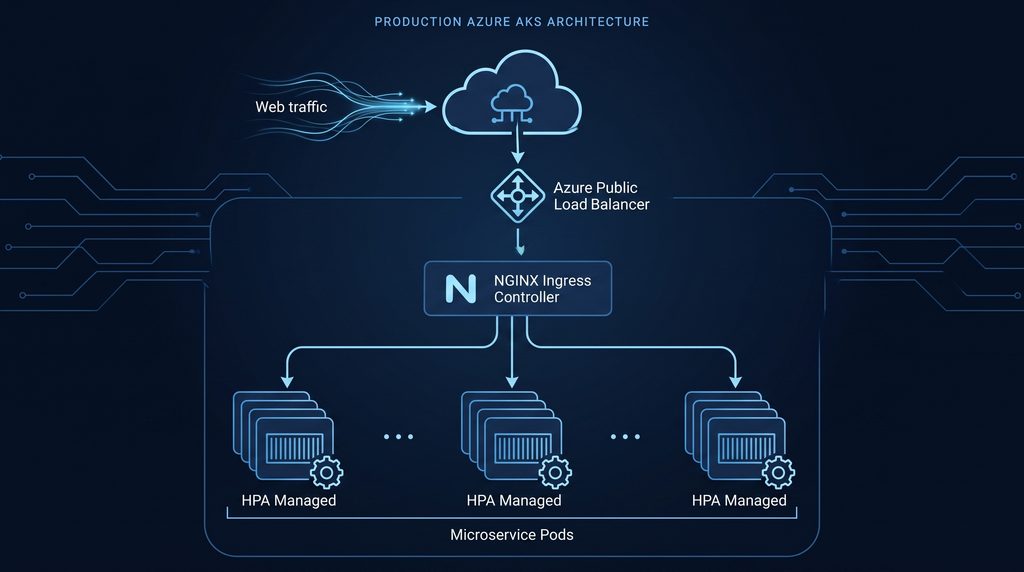
Step 1: Provision a Managed AKS Cluster with Azure CLI
Managed cloud engines eliminate control plane maintenance costs. For automated cluster management, explore the official Azure Kubernetes Service (AKS) Documentation to review supported VM SKUs and regional availability. Using Azure CLI, provision an AKS cluster configured with managed identity authentication:
# Set deployment environment variables
RESOURCE_GROUP="rg-devstack-aks-prod"
LOCATION="eastus"
CLUSTER_NAME="aks-devstack-cluster"

# Create dedicated Azure Resource Group
az group create --name $RESOURCE_GROUP --location $LOCATION

# Provision a production-ready 2-node AKS cluster with Azure Managed Identity
az aks create \
  --resource-group $RESOURCE_GROUP \
  --name $CLUSTER_NAME \
  --node-count 2 \
  --node-vm-size Standard_B2s \
  --enable-managed-identity \
  --generate-ssh-keys

# Merge AKS credentials into your local kubectl config
az aks get-credentials --resource-group $RESOURCE_GROUP --name $CLUSTER_NAME
Verify your cluster connectivity:
kubectl get nodes -o wideStep 2: Deploy the NGINX Ingress Controller
Unlike Docker Swarm’s basic internal routing mesh, Kubernetes uses Ingress Controllers to manage Layer 7 path-based routing, header transformations, and SSL/TLS termination at the cluster edge.
Install the official NGINX Ingress Controller using Helm:
# Add the ingress-nginx Helm repository
helm repo add ingress-nginx https://kubernetes.github.io/ingress-nginx
helm repo update

# Install NGINX Ingress into an isolated namespace with Azure Load Balancer health checks
helm install ingress-nginx ingress-nginx/ingress-nginx \
  --create-namespace \
  --namespace ingress-system \
  --set controller.service.annotations."service\.beta\.kubernetes\.io/azure-load-balancer-health-probe-request-path"=/healthz
Obtain the external public IP provisioned for your ingress controller:
kubectl get service ingress-nginx-controller -n ingress-system --watchStep 3: Production Deployment, ClusterIP Service & Ingress Rules
Create a unified deployment manifest named production-stack.yaml. This defines your application container, sets strict hardware compute bounds, configures internal ClusterIP service routing, and binds edge traffic to the Ingress controller:
apiVersion: apps/v1
kind: Deployment
metadata:
  name: devstack-api
  namespace: default
  labels:
    app: devstack-api
spec:
  replicas: 2
  selector:
    matchLabels:
      app: devstack-api
  template:
    metadata:
      labels:
        app: devstack-api
    spec:
      containers:
      - name: web-api
        image: mcr.microsoft.com/azuredocs/aci-helloworld:latest
        resources:
          requests:
            cpu: 100m
            memory: 128Mi
          limits:
            cpu: 250m
            memory: 256Mi
        ports:
        - containerPort: 80
---
apiVersion: v1
kind: Service
metadata:
  name: devstack-api-service
  namespace: default
spec:
  type: ClusterIP
  ports:
  - port: 80
    targetPort: 80
    protocol: TCP
    name: http
  selector:
    app: devstack-api
---
apiVersion: networking.k8s.io/v1
kind: Ingress
metadata:
  name: devstack-api-ingress
  namespace: default
  annotations:
    nginx.ingress.kubernetes.io/rewrite-target: /
    nginx.ingress.kubernetes.io/ssl-redirect: "false"
spec:
  ingressClassName: nginx
  rules:
  - http:
      paths:
      - path: /
        pathType: Prefix
        backend:
          service:
            name: devstack-api-service
            port:
              number: 80
Deploy the workload to your AKS cluster:
kubectl apply -f production-stack.yamlStep 4: Configure the Horizontal Pod Autoscaler (HPA)
A major production factor when assessing Kubernetes vs Docker Swarm is native, metrics-driven auto-scaling. In the Kubernetes vs Docker Swarm showdown, Kubernetes wins on dynamic resource management because the Horizontal Pod Autoscaler (HPA) continuously samples pod metrics and dynamically adjusts replica counts between defined thresholds.
Create a manifest file named hpa-autoscale.yaml:
apiVersion: autoscaling/v2
kind: HorizontalPodAutoscaler
metadata:
  name: devstack-api-hpa
  namespace: default
spec:
  scaleTargetRef:
    apiVersion: apps/v1
    kind: Deployment
    name: devstack-api
  minReplicas: 2
  maxReplicas: 10
  metrics:
  - type: Resource
    resource:
      name: cpu
      target:
        type: Utilization
        averageUtilization: 70
  - type: Resource
    resource:
      name: memory
      target:
        type: Utilization
        averageUtilization: 80
Apply the auto-scaling policy:
kubectl apply -f hpa-autoscale.yamlVerify real-time autoscaler tracking:
kubectl get hpa devstack-api-hpa --watchKey Production Takeaways
- Set CPU & Memory Boundaries: Kubernetes requires container resource requests to schedule pods accurately across worker nodes and calculate HPA thresholds.
- Use Cloud Managed Identities: By configuring Azure Managed Identities during AKS provisioning, worker nodes authenticate with container registries and Key Vaults without embedded credentials.
- Isolate Infrastructure Namespaces: Separate cluster tooling (such as Ingress and monitoring agents) from application workloads using dedicated Kubernetes namespaces for clean security boundaries.
- Automate via CI/CD: Pair these Kubernetes deployment manifests with automated pipelines, such as our GitHub Actions CI/CD Blueprint, to enable zero-downtime rolling updates on every code push.
Ultimately, the choice between Kubernetes vs Docker Swarm depends on your team’s scale, infrastructure automation maturity, and application resilience requirements.