Modern DevOps engineering relies heavily on automated continuous integration and continuous deployment (CI/CD) pipelines to ship features rapidly without introducing downtime or code regressions. Implementing a robust GitHub Actions CI/CD workflow allows software development teams to validate pull requests, execute comprehensive test suites, package isolated application binaries, and trigger zero-downtime cloud releases automatically.
Without structured pipeline automation, development lifecycles suffer from inconsistent build artifacts, slow manual deployment verification, and credential leak risks. Adopting production-grade pipeline patterns transforms your delivery frequency while guaranteeing enterprise stability.
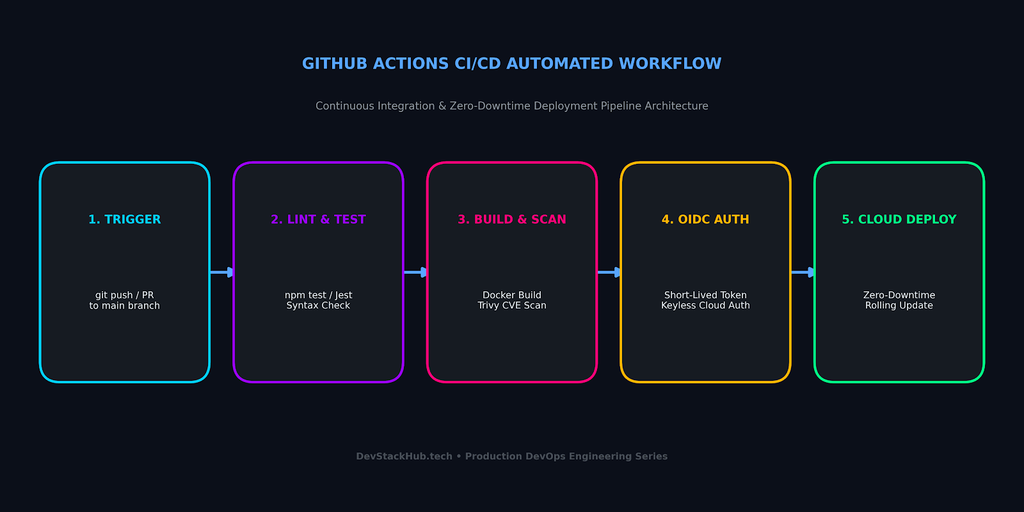
1. Production Project Architecture & Directory Structure
Configuring a maintainable directory layout is essential when implementing a scalable GitHub Actions CI/CD workflow across multi-service engineering repositories. To build a deterministic CI/CD pipeline, your repository must separate application logic, test frameworks, container configurations, and workflow definitions into clean modules:
github-actions-cicd-template/
├── .github/
│   └── workflows/
│       ├── ci-pipeline.yml      # Continuous Integration (Lint, Test, Matrix)
│       └── deploy.yml           # Continuous Deployment (Docker Build & Cloud Release)
├── src/
│   ├── server.js                # Application Entrypoint
│   └── app.test.js              # Jest Unit & Integration Test Suite
├── Dockerfile                   # Multi-stage container packaging
├── package.json                 # Project dependencies & automated test scripts
└── .gitignore                   # Ignored files and local environment variables
Application Entrypoint (src/server.js)
A production-ready microservice requires distinct health and readiness endpoints for cloud orchestrators:
const express = require('express');
const app = express();
const PORT = process.env.PORT || 3000;

app.use(express.json());

app.get('/health', (req, res) => {
  res.status(200).json({ status: 'UP', timestamp: new Date().toISOString() });
});

app.get('/api/v1/data', (req, res) => {
  res.status(200).json({ message: 'GitHub Actions Production Delivery Pipeline Active' });
});

if (process.env.NODE_ENV !== 'test') {
  app.listen(PORT, () => {
    console.log(`Application running securely on port ${PORT}`);
  });
}

module.exports = app;
Automated Test Suite (src/app.test.js)
Automated test gates validate application response codes before build artifacts are generated:
const request = require('supertest');
const app = require('./server');

describe('API Health & Route Verification', () => {
  it('GET /health should return status UP with 200 code', async () => {
    const res = await request(app).get('/health');
    expect(res.statusCode).toEqual(200);
    expect(res.body.status).toBe('UP');
  });

  it('GET /api/v1/data should return operational payload', async () => {
    const res = await request(app).get('/api/v1/data');
    expect(res.statusCode).toEqual(200);
    expect(res.body.message).toContain('GitHub Actions');
  });
});
Project Manifest (package.json)
Ensure the scripts section handles missing test edge-cases gracefully without breaking pipeline exit codes:
{
  "name": "github-actions-cicd-production-template",
  "version": "1.0.0",
  "description": "Production CI/CD pipeline template with GitHub Actions",
  "main": "src/server.js",
  "scripts": {
    "start": "node src/server.js",
    "lint": "eslint src/ --ext .js --if-present",
    "test": "jest --passWithNoTests --detectOpenHandles"
  },
  "dependencies": {
    "express": "^4.19.2"
  },
  "devDependencies": {
    "eslint": "^8.57.0",
    "jest": "^29.7.0",
    "supertest": "^6.3.4"
  }
}
2. Multi-Stage Containerization (Dockerfile)
Using multi-stage Docker builds ensures minimal image size, enhanced container security, and significantly faster runner execution in your GitHub Actions CI/CD pipeline. Never package development dependencies or source compilers into production container images. Using multi-stage Docker builds ensures minimal image size, enhanced security, and faster upload/download times across GitHub Actions runners:
# Stage 1: Build & Dependency Resolution
FROM node:20-alpine AS dependencies
WORKDIR /usr/src/app
COPY package*.json ./
RUN npm ci --only=production

# Stage 2: Minimal Distroless / Production Runtime
FROM node:20-alpine AS runner
WORKDIR /usr/src/app
ENV NODE_ENV=production
ENV PORT=3000

# Copy compiled dependencies and source files
COPY --from=dependencies /usr/src/app/node_modules ./node_modules
COPY package.json ./
COPY src/ ./src/

# Run as non-root user for security compliance
USER node
EXPOSE 3000

CMD ["node", "src/server.js"]
3. Continuous Integration Pipeline (.github/workflows/ci-pipeline.yml)
The primary gate of any GitHub Actions CI/CD strategy is automated linting and matrix testing to catch syntactical and runtime regressions before merging. The CI workflow acts as the first operational gate. It executes linting, matrix testing across multiple Node.js versions, and automated dependency caching to prevent regression errors from entering the main branch.
name: Production CI Pipeline

on:
  push:
    branches: [ "main" ]
  pull_request:
    branches: [ "main" ]
  workflow_dispatch:

jobs:
  lint-and-test:
    name: Lint & Automated Tests
    runs-on: ubuntu-latest

    strategy:
      matrix:
        node-version: [18.x, 20.x]

    steps:
      - name: Checkout Source Code
        uses: actions/checkout@v4

      - name: Setup Node.js ${{ matrix.node-version }}
        uses: actions/setup-node@v4
        with:
          node-version: ${{ matrix.node-version }}
          cache: 'npm'

      - name: Install Project Dependencies
        run: npm ci

      - name: Run Static Code Analysis (ESLint)
        run: npm run lint --if-present

      - name: Execute Automated Unit Tests
        run: npm test
Configuring automated test runners ensures that your GitHub Actions CI/CD pipeline intercepts runtime failures before build artifacts are generated.
4. Zero-Downtime Continuous Deployment with OIDC (.github/workflows/deploy.yml)
Authenticating securely via OpenID Connect (OIDC) represents the gold standard for enterprise GitHub Actions CI/CD deployments without storing long-lived cloud credentials. Security breaches in automated pipelines often occur due to exposed, long-lived API tokens. Modern GitHub Actions architectures authenticate directly to cloud providers (such as Microsoft Azure or AWS) using OpenID Connect (OIDC) tokens rather than static passwords. By eliminating static cloud credentials, OIDC provides a secure authentication bridge for your production GitHub Actions CI/CD pipelines.
name: Production CD Deployment

on:
  push:
    branches: [ "main" ]
  workflow_dispatch:

permissions:
  id-token: write   # Required for requesting Azure/AWS OIDC federated tokens
  contents: read

jobs:
  build-and-deploy:
    name: Build, Package & Deploy
    runs-on: ubuntu-latest
    environment:
      name: production
      url: https://devstackhub.tech

    steps:
      - name: Checkout Source Code
        uses: actions/checkout@v4

      - name: Setup Docker Buildx
        uses: actions/setup-buildx-action@v3

      - name: Cache Docker Layers
        uses: actions/cache@v4
        with:
          path: /tmp/.buildx-cache
          key: ${{ runner.os }}-buildx-${{ github.sha }}
          restore-keys: |
            ${{ runner.os }}-buildx-

      - name: Authenticate to Cloud Provider via OIDC
        uses: azure/login@v2
        with:
          client-id: ${{ secrets.AZURE_CLIENT_ID }}
          tenant-id: ${{ secrets.AZURE_TENANT_ID }}
          subscription-id: ${{ secrets.AZURE_SUBSCRIPTION_ID }}

      - name: Build & Tag Container Image
        uses: docker/build-push-action@v5
        with:
          context: .
          push: false
          tags: devstackhub/app-microservice:${{ github.sha }}
          cache-from: type=local,src=/tmp/.buildx-cache
          cache-to: type=local,dest=/tmp/.buildx-cache-new,mode=max

      - name: Zero-Downtime Staging Slot Deployment
        run: |
          echo "Deploying artifact tag ${{ github.sha }} to staging slot..."
          # az webapp deployment container config --name devstack-app --resource-group rg-prod --slot staging
          echo "Executing automated smoke test health probes on staging slot..."

      - name: Swap Staging Slot to Production
        run: |
          echo "Traffic validation passed. Swapping deployment slots to production with zero downtime..."
          # az webapp deployment slot swap --name devstack-app --resource-group rg-prod --slot staging --target-slot production

      - name: Move Docker Cache
        run: |
          rm -rf /tmp/.buildx-cache
          mv /tmp/.buildx-cache-new /tmp/.buildx-cache
💻 Runnable Source Code & Pipeline Templates:
Access the complete, working CI/CD workflows, test suites, and project structure in the companion GitHub Actions CI/CD Production Template Repository.
5. Architectural Pipeline Summary & Comparison
Here is a comparison between conventional deployment scripts and an optimized GitHub Actions CI/CD architecture.
| Pipeline Component | Basic Workflow | Production-Grade GitHub Actions Workflow |
| Authentication | Hardcoded long-lived secrets/passwords | Short-lived Federated OpenID Connect (OIDC) tokens |
| Dependency Speed | Fresh npm install on every run | Granular npm ci with runner OS-level dependency caching |
| Testing Scope | Single Node.js version test | Matrix validation across LTS runtimes (18.x, 20.x) |
| Deployment Method | Direct live container restart (causes downtime) | Staging slot warmup followed by instantaneous slot swapping |
| Docker Build | Single-stage default build | Multi-stage distroless build with BuildKit layer caching |
6. Common GitHub Actions CI/CD Pitfalls to Avoid
Pinning actions to specific commit hashes ensures immutable dependency trees across all GitHub Actions CI/CD automated jobs.
- Unpinned Action Versions: Relying on mutable action tags (like
@v1or@latest) can introduce breaking changes unexpectedly. Always pin verified actions (e.g.,actions/checkout@v4). - Unbounded Runner Concurrency: Running parallel matrix jobs without limits can quickly exhaust your runner minutes. Use
concurrencygroups to cancel outdated runs when new commits arrive:
concurrency:
  group: ${{ github.workflow }}-${{ github.ref }}
  cancel-in-progress: true
Missing Secret Masking: Avoid running shell commands that echo raw base64 or interpolated variables to stdout logs.
Best Practices for Enterprise Workflow Scaling
Mastering GitHub Actions CI/CD allows engineering teams to eliminate manual release friction, maintain reproducible build environments, and ship microservices confidently. By combining isolated matrix test suites, multi-stage Docker layer caching, and passwordless OIDC cloud authentication, you establish a resilient pipeline architecture that scales effortlessly alongside growing codebases.
As your team expands, continuously audit workflow run times, enforce branch protection rules that mandate passing CI checks before merging, and periodically review runner permissions to maintain least-privilege security across all automation scripts.
Connecting Pipelines to Cloud Deployments
Pairing automated workflow execution with container platforms creates a secure continuous delivery loop:
- Build optimized images using our Production-Ready Docker Containers Guide.
- Combine your workflow triggers with zero-downtime deployment slots via our Azure App Service Deployment Guide.
- For detailed workflow syntax references, consult the official GitHub Actions Documentation.
💻 Runnable Source Code & Pipeline Templates:
Access the complete, working CI/CD workflows, test suites, and project structure in our companion GitHub Actions CI/CD Production Template Repository.